
AI Overview:
Efficiency, cut costs, and boost productivity using managed print services, workflow automation, cloud printing, and sustainable practices. It explains how MPS assessments, policies, monitoring, and consumables management reduce cost-per-page, downtime, and security risks. Readers also learn key cost-saving tactics—print audits, duplex defaults, quotas, and managed toner programs—plus how automation reduces manual errors and speeds document workflows. The article highlights cloud and hybrid print models for multi-site teams and outlines eco-friendly options like energy-efficient devices and recycling programs. Overall, it provides quick frameworks, KPIs, and vendor examples to help businesses build a smarter, lower-cost print environment.
How to Optimize Printing, Reduce Costs, and Enhance Productivity
Efficient printing means matching the right devices, policies, and software to actual business workflows so documents flow securely and costs decline while uptime and productivity increase. This article explains how managed print services, print workflow automation, cloud and hybrid printing, secure print controls, cost-reduction tactics, and sustainable practices work together to deliver measurable improvements in print efficiency. Readers will learn definitional frameworks, step-by-step implementation guidance, and practical metrics to benchmark savings and service levels across mid-size and enterprise environments.
The guide covers how to run an effective print audit, which automation tools to prioritize, methods to control consumables spend, and which secure printing controls reduce compliance risk without blocking productivity. Each major section includes short lists and comparison tables to make decisions actionable, plus examples of how vendor-managed programs and AI tools can quantify lease versus buy or service choices. By the end you’ll have checklists, EAV tables mapping services to KPIs, and clear next steps to reduce printing costs while improving document workflows and security.
What Are Managed Print Services and How Do They Improve Print Efficiency?
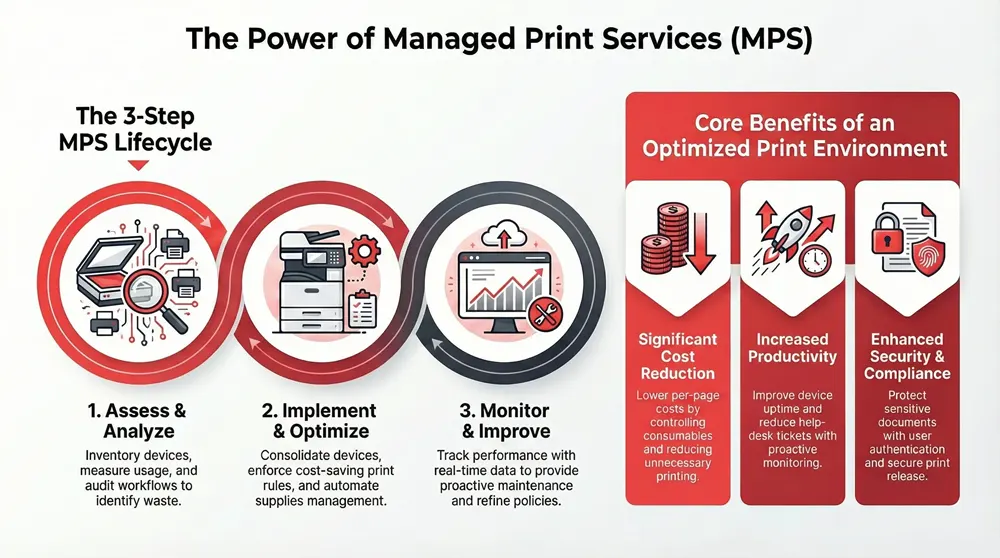
Managed Print Services (MPS) are a coordinated suite of assessment, device provisioning, consumables management, policy enforcement, and continuous monitoring designed to align printing resources with business objectives. MPS works by measuring actual usage, applying rules and device consolidation, and automating supply replenishment to lower cost-per-page and increase uptime. The result is lower operational overhead, improved device availability, and stronger security controls that together increase productivity for end users and IT teams. Understanding the components and KPIs of an MPS program is the first step to predicting measurable outcomes such as percent cost savings, reduced help-desk tickets, and better compliance reporting. Below we summarize the core benefits and then explain the typical MPS lifecycle, supported by a comparison table mapping components to expected impacts.
Managed Print Services deliver repeatable benefits:
- Cost reduction through fleet optimization and consumables control that lowers cost-per-page.
- Productivity gains via centralized monitoring and faster repair/consumable replenishment.
- Security and compliance by enforcing authentication, secure release, and logging for audit trails.
These benefits flow from the three main activities of a managed program—assessment, policy implementation, and continuous monitoring—and each phase informs the next to create a feedback loop that drives continuous improvement.
Managed Print Services offer concrete components and measurable value. The table below maps common MPS components to representative KPIs and typical value outcomes.
| MPS Component | Typical Metric | Expected Impact |
|---|---|---|
| Fleet Assessment | Devices analyzed, pages/month | Identifies consolidation opportunities; baseline for savings |
| Policy & Rules | % jobs following rules (duplex/grayscale) | Reduces paper and color usage; lowers cost-per-page |
| Device Provisioning | Device uptime (%) | Increases availability and reduces downtime |
| Consumables Management | Automated replenishment accuracy (%) | Lowers stockouts and emergency orders |
| Monitoring & Reporting | Number of alerts, time-to-resolution | Improves SLA adherence and reduces help-desk load |
This mapping shows how discrete MPS tasks translate into financial and operational benefits. Quantifying these KPIs during an initial assessment enables realistic ROI forecasts and prioritizes the highest-impact interventions.
What Are the Key Benefits of Managed Print Services for Businesses?
Managed Print Services deliver a blend of financial, operational, and security gains that scale across business sizes. First, they reduce direct and indirect printing costs by consolidating devices, enforcing print rules, and managing consumables to lower cost-per-page; many organizations realize double-digit percentage savings when policies are enforced consistently. Second, MPS improves operational reliability through proactive monitoring and maintenance, which decreases service interruptions and reduces in-office downtime for staff. Third, security and compliance improve because MPS centralizes control over authentication, secure release, and auditing so sensitive documents do not leave devices unattended. These benefits together create predictable budgets, fewer surprise expenses, and clearer reporting for finance and IT.
The connection between these benefits and measurable business outcomes is straightforward: lower per-page costs plus fewer support incidents equals reduced total cost of ownership, while centralized reporting supports compliance and process optimization. Understanding each benefit’s measurement—percent savings, time saved per employee, incident reduction—helps prioritize interventions and set realistic targets for a managed program.
How Does Managed Print Services Work: Assessment, Implementation, and Monitoring?
An MPS lifecycle starts with a comprehensive print audit that inventories hardware, measures print volumes, collects user behavior data, and identifies inefficient configurations. The assessment phase establishes baseline metrics—pages per device, color usage, average job sizes—and surfaces quick wins like default duplex and grayscale settings. The implementation phase translates assessment findings into policies, device re-provisioning, and consumables contracts, often consolidating MFPs and aligning models to use-case needs. Ongoing monitoring then uses meters, sensors, and reporting dashboards to track KPIs, trigger proactive maintenance, and adjust policies to evolving business demands. Continuous optimization includes periodic audits to validate savings and rollout of new automation or security features.
This lifecycle is iterative: feedback from monitoring informs further consolidation and policy tweaks, and automation of routine tasks (like reordering toner) reduces manual overhead. A clear governance model—who sets policies, who approves exceptions, and how KPIs are reported—ensures the service remains effective and aligned with changing priorities.
After explaining how MPS works, it’s useful to see how these capabilities are delivered in real programs offered by some providers and what to expect when you request an assessment.
Automated Business Machines (operating as 1-800 Office Solutions) provides managed print assessments, ongoing monitoring, and AI-enhanced tools as part of its service offering. Their programs emphasize top-of-the-line equipment, free installation, and 24/7 customer support while using AI-powered calculators to estimate lease and cost-saving scenarios. For businesses evaluating managed print options, including vendor-managed consumables and predictive monitoring, these vendor services serve as one practical implementation model among others. By comparing the assessment outcomes and KPI targets from different providers, organizations can choose a partner whose scope and SLAs match their efficiency and security goals.
How Can Print Workflow Automation Streamline Office Printing Processes?

Print workflow automation automates routine document tasks—capture, classification, routing, approval, and print rules—to reduce manual handling, eliminate repetitive errors, and accelerate document lifecycles. Automation works by integrating capture tools, OCR, and print management platforms so documents follow predefined rules based on content, user, or destination, reducing time-to-delivery and increasing traceability. The direct benefits include reduced processing time for document-heavy tasks, fewer misprints, and lower administrative overhead for scanning and filing. Effective automation ties into document management systems and MFPs to create a seamless path from paper or digital capture to secure storage or distribution.
Understanding which workflows to automate and selecting the right orchestration tools are essential first steps. Below is a clear set of common automation workflows and then specific tool categories to consider when designing a print automation roadmap.
Common print workflow automations include:
- Scan-to-cloud workflows that capture paper documents and push them to DMS with metadata.
- Approval routing that sends documents for sign-off automatically before printing or archiving.
- Print rules that reroute large or color prints to centralized devices or convert jobs to digital first.
These automation patterns reduce manual steps and errors while improving auditability and searchability for records, creating both time savings and governance improvements that scale across teams.
What Software and Tools Enable Effective Print Workflow Automation?
Effective automation requires a combination of print management platforms, document capture software, OCR/ICR engines, and workflow orchestration or RPA connectors to integrate with ERP or DMS systems. Print management platforms enforce policies and collect analytics; document capture tools apply OCR and metadata tagging; and orchestration layers sequence tasks, handle exceptions, and push data to downstream systems. Selection criteria should prioritize security, integration capabilities (APIs/connectors), scalability, and support for hybrid cloud environments. Cloud-native tools simplify remote provisioning, while on-prem components may be necessary where latency or compliance constraints exist.
When choosing tools, evaluate: integration with existing DMS/ERP, support for secure release and authentication, and reporting/analytics features that surface cost and compliance metrics. A staged pilot with high-volume departments helps validate benefits before wider rollout and provides concrete time-saved and error-reduction metrics for stakeholders.
How Does Workflow Automation Reduce Manual Errors and Increase Productivity?
Automation eliminates repeatable human tasks—manual data entry, misfiled documents, and ad-hoc routing errors—by enforcing templates, extracting metadata with OCR, and routing based on business rules. This reduces error rates and accelerates processing times; for example, automated capture and routing can cut invoice processing times from days to hours in accounts payable workflows. Productivity increases because staff spend less time correcting mistakes and more time on high-value tasks, while audit trails from automated workflows improve traceability and speed dispute resolution. Automation also supports exception handling: jobs that fail validation are directed to a human reviewer with context, not lost in a queue.
Metrics to monitor automation success include time-per-process, error rate reduction, and throughput increases. These measurements make it possible to quantify ROI and justify expanding automation to additional processes.
What Are the Best Strategies to Reduce Printing Costs in Your Business?
Reducing printing costs combines policy, device strategy, and consumables lifecycle management to lower both direct and indirect expenses. Core approaches include conducting a print audit to identify waste, implementing default duplex and grayscale settings, enforcing print quotas and rules, consolidating devices to appropriate MFP classes, and switching to managed consumables programs to control inventory and per-page costs. Each tactic addresses a different cost driver—paper use, color overuse, excessive device proliferation, or uncontrolled supply orders—so combined strategies yield the largest savings. The actionable steps below provide quick wins and governance tactics to sustain cost reductions over time.
The highest-impact cost-reduction strategies typically include the following prioritized interventions:
- Conduct a baseline print audit to find top users, devices, and job types driving costs.
- Enforce default duplex and grayscale policies to reduce paper and color expenses.
- Implement managed consumables and automated reordering to prevent emergency purchases and optimize yield.
Implementing these measures often yields immediate savings in paper and toner usage and creates a platform for longer-term changes such as consolidation and leasing adjustments.
Before reviewing individual tactics in depth, here is a comparative table showing typical strategies and estimated impact to help prioritize initiatives.
| Strategy | Typical Savings / Impact | Example Scenario |
|---|---|---|
| Duplex & default grayscale | 10–30% paper/cost reduction | Office-wide defaults reduce paper use |
| Print audits & quotas | 15–35% reduction in unnecessary printing | Identify heavy users and enforce limits |
| Managed toner programs | 5–20% lower consumables cost | Automated supply reduces emergency purchases |
| Leasing vs buying optimization | Variable; improves cash flow/upgradeability | Leasing can lower upfront capital expenditures |
How Do Print Audits and Duplex Printing Help Cut Expenses?
Print audits gather device inventories, meter readings, and user behavior to reveal inefficient devices, excessive color use, and departments with high waste. Audits provide the data to set targets—pages per user, color ratio, and recommended device classes—and show where consolidation will produce immediate savings. Enabling duplex printing and making grayscale the default reduces paper and color toner use, with many organizations seeing double-digit paper reductions simply by policy enforcement. Audits also inform user training and exception policies so critical jobs still print correctly while wasteful patterns are curtailed.

A practical audit checklist includes device counts, monthly page volumes, top users, job size distribution, and policy compliance checks. From these data points, quick wins can be prioritized, measured, and repeated to maintain momentum and quantify savings over time.
What Role Does Ink and Toner Management Play in Cost Savings?
Ink and toner management reduces both direct consumables spend and indirect labor costs by centralizing procurement, implementing automated reordering, and tracking yield and cost-per-page. Managed supply programs negotiate consistent pricing, standardize cartridges across fleets where possible, and use telemetry to reorder before stockouts—minimizing emergency orders and downtime. Yield monitoring and cost-per-page analysis reveal which devices or third-party supplies deliver the best total cost and quality tradeoffs, allowing procurement to make evidence-based decisions between OEM and compatible supplies.
Controls such as centralized procurement policies, automated reorder thresholds, and reporting on cost-per-page provide transparency and maintain steady operating budgets while supporting sustainability choices like remanufactured cartridges when appropriate.
Automated Business Machines (operating as 1-800 Office Solutions) offers services that directly support these cost-saving programs, including print audits, toner and consumables management, copier leasing options, and repair services. Their offerings emphasize top-of-the-line equipment, free installation, and 24/7 customer support plus AI tools designed to estimate lease savings—an example of how vendor-managed programs can operationalize the audit-to-savings lifecycle. Businesses considering external support should request a detailed audit and a comparison of leasing versus buying that includes projected cost-per-page and lifecycle maintenance assumptions.
How Do Secure Printing Solutions Protect Business Data and Ensure Compliance?
Secure printing solutions address common vulnerabilities—documents left on output trays, unencrypted print jobs in transit, and devices with default credentials—by implementing authentication, secure release workflows, encryption, and centralized audit logging. These controls prevent unauthorized access to sensitive documents and create a chain of custody for compliance purposes. Effective secure printing balances protection with usability so users can authenticate and release documents quickly without introducing friction that leads to risky workarounds. The following list outlines best practices followed by a short explanation of how secure release systems operate.
Key secure printing practices include:
- Implement user authentication at devices (PIN, badge, or SSO) to ensure only authorized users retrieve prints.
- Use secure print release workflows so jobs are held until released by the authenticated user.
- Encrypt print jobs in transit and enable device-level hardening with password and firmware controls.
What Are the Best Practices for User Authentication and Access Control?
Authentication options include PIN entry, proximity badge release, and single-sign-on integration; each offers different balance of security and convenience. PIN entry is simple to deploy and improves security over open printing, while badge or SSO-based methods integrate with corporate identity systems for stronger access control and simpler user experience. Role-based access policies further restrict functions—limiting color printing or high-volume privileges to designated users—reducing unnecessary expense and exposure. Implementation requires configuring devices, testing authentication flows, and monitoring logs to ensure policies are enforced and exceptions are handled.
A practical rollout checklist includes pilot testing with high-volume teams, training materials, and reporting to confirm reduced unauthorized prints and improved auditability. Monitoring and periodic reviews ensure policies remain aligned with changing roles and compliance needs.
How Do Secure Print Release Systems Prevent Data Breaches?
Secure print release systems hold jobs in a protected queue until an authenticated user releases them at the device, eliminating the risk of documents left on output trays. Release options include PIN entry, badge tap, or mobile release so users can authenticate with minimal disruption. These systems integrate with encryption and logging so jobs are protected in transit and print activity is recorded for audits. Operational considerations include balancing user convenience—fast release versus additional authentication—and ensuring fallback processes for forgotten credentials that do not defeat security.
Complementary controls such as job encryption, secure device configuration, and retention policies strengthen the overall security posture and provide documented evidence that controls are in place and operating as intended.
Why Should Businesses Adopt Cloud Printing for Enhanced Efficiency?
Cloud printing centralizes management by moving print job routing, policy enforcement, and analytics into a cloud platform, enabling remote provisioning, simplified updates, and centralized policy controls that benefit distributed workforces. Cloud-native models reduce on-prem server overhead and simplify support, while hybrid models retain local servers for latency-sensitive or compliance-constrained workloads. Security considerations include ensuring encrypted channels, access controls, and appropriate data residency options. Cloud printing improves scalability, eases remote worker support, and simplifies fleet management in organizations with multiple locations and mobile users.
Adopting cloud printing is a decision based on needs: remote access and simplified management favor cloud-native, while legacy applications or strict compliance may necessitate hybrid deployments. The table below compares cloud printing modes and business benefits to help choose the right model.
| Cloud Model | Attribute | Business Benefit |
|---|---|---|
| Cloud-native | Centralized policy, no local servers | Reduced infrastructure and easier remote provisioning |
| Hybrid | Cloud control + on-prem print server | Supports legacy apps and compliance with lower latency |
| On-prem (server-assisted) | Full local control | Maximum compatibility and data residency control |
The integration of cloud computing frameworks is crucial for optimizing operations within the online printing industry.
Cloud Computing Framework for Online Printing Industry Optimization
ABSTRACT: AbstractThis research aims to design a cloud computing IT framework for the online printing industry based on a detailed literature review, the development of proof of concepts (PoC), and the conduction of a focus group. The framework can be adopted by the online printing industry or by vendors of print-specific applications to optimize their products for the online printing industry. The author has been working in the online printing process optimization and automation since 2007. During this time, he got deep insight into many industry-specific applications, their architectural design, and their challenges being used in the context of online printing. While conducting this research, the author identified a gap between what cloud computing technologies can do and how systems are designed in the (online) printing industry. This research’s cloud computing IT framework aims to close this gap. The author has published the proof of concept of the cloud computing IT framework as an Open Sou
1. Ph.D. Dissertation by Stefan Meissner. Technological University Dublin – Tallaght Campus Department of Business, April 2024.
2. This research aims to design a cloud computing IT framework for the online printing industry based on a detailed literature review, the development of proof of concepts (PoC), and the conduction of a focus group. The framework can be adopted by the online printing industry or by vendors of print-specific applications to optimize their products for the online printing industry. The author has been working in the online printing process optimization and automation since 2007. During this time, he got deep insight into many industry-specific applications, their architectural design, and their challenges being used in the context of online printing. While conducting this research, the author identified a gap between what cloud computing technologies can do and how systems are designed in the (online) printing industry. This research’s cloud computi
How can a cloud computing IT framework be created and applied effectively in the online printing industry?, 2024
What Are the Advantages of Cloud-Based Print Management?
Cloud-based print management offers centralized policy control, remote monitoring, and simplified device provisioning, reducing the need for local server maintenance and enabling faster rollout of rules and updates. For distributed teams and hybrid work models, cloud printing enables users to print securely from multiple locations and devices while IT maintains a single management plane. Cost advantages include lower infrastructure spending and potentially reduced break/fix cycles via remote diagnostics. The ability to aggregate analytics from the cloud supports better decisions about consolidation and lifecycle planning.
A typical scenario is a multi-site company that consolidates reporting and policies in the cloud to apply consistent security and cost rules across locations, improving governance and reducing IT operational load.
How Do Hybrid Cloud Printing Models Support Business Needs?
Hybrid models combine cloud management with on-prem print servers or gateways to support legacy applications, low-latency requirements, or strict compliance that mandates local data handling. Hybrid architectures allow central policy and analytics while routing sensitive data through local servers that meet regulatory or performance needs. This approach supports gradual migration to cloud controls without disrupting mission-critical applications. Integration challenges include ensuring consistent policy enforcement and secure channels between cloud and on-prem components, but the hybrid model gives organizations flexibility to modernize while honoring constraints.
Decision criteria for hybrid adoption include legacy app dependency, compliance requirements, and desired pace of cloud migration. Hybrid architectures are particularly useful when instantaneous local printing is essential but centralized governance is still desirable.
How Can Sustainable Printing Practices Benefit Your Business and the Environment?
Sustainable printing practices reduce environmental impact while often delivering cost savings and positive brand effects. Actions include selecting energy-efficient printers with favorable lifecycle energy profiles, using recycled-content papers, adopting remanufactured or high-yield consumables, and implementing waste-reduction programs such as central collection and recycling of cartridges and paper. These practices lower resource consumption, reduce disposal costs, and can contribute to corporate sustainability reporting. Pairing sustainability with measurable ROI—such as cost savings from duplex defaults and reduced consumables orders—makes the business case stronger and supports corporate responsibility goals.
A multifaceted sustainability program includes procurement policies, employee behavior changes, and vendor-managed recycling to both reduce waste and document environmental impact. Below are product and program options to consider, followed by how to measure program success.
What Eco-Friendly Inks, Papers, and Energy-Efficient Printers Are Available?
Eco-friendly options include papers with high recycled content and certifications, remanufactured or high-yield toner cartridges, and printers that qualify for energy-efficiency ratings and low idle power consumption. Selection criteria should include total cost of ownership, expected yield, and lifecycle environmental impact rather than upfront price alone. Energy-saving features—automatic sleep modes, efficient fusers, and duplex capability—cut power consumption, while supply choices like remanufactured cartridges reduce landfill waste. Evaluating TCO with sustainability metrics ensures purchases align with both budgetary and environmental objectives.
Considering lifecycle impacts and vendor recycling programs helps organizations meet sustainability targets without compromising device reliability or document quality.
How Do Waste Reduction and Recycling Programs Improve Sustainability?
Effective waste reduction programs establish collection points for used cartridges and paper, partner with remanufacturers or recycling vendors, and report metrics such as kilograms of paper saved or cartridges recycled. Vendor-managed recycling simplifies operations by handling reverse logistics and providing reporting that supports sustainability disclosures. Programs should also include behavior-change activities—default duplex, digital-first policies, and user training—to reduce gross printing volume. Measurement and reporting allow organizations to track progress and link sustainability initiatives to cost savings and CSR outcomes.
Tracking outcomes like percentage reduction in paper use, number of cartridges recycled, and reductions in supply orders turns sustainability efforts into measurable business results and supports continuous improvement.
As a practical next step, businesses can request a managed print assessment and an AI-enabled lease-versus-buy analysis to quantify potential savings and operational improvements. Automated Business Machines (operating as 1-800 Office Solutions) provides managed print services, copier leasing, repair services, document management solutions, and IT services that support assessments and implementation. Their programs highlight top-of-the-line equipment, free installation, unlimited prints options in some plans, and 24/7 customer support; they also provide AI-powered tools like a copier lease savings calculator to help estimate financial outcomes. Contacting a managed provider for an initial audit can convert the strategies in this guide into an actionable roadmap tailored to your environment.
https://shorturl.fm/wgndC
https://shorturl.fm/AfFir
https://shorturl.fm/lr1hX
https://shorturl.fm/cDsgR
https://shorturl.fm/BzpKc
https://shorturl.fm/iYuf5
https://shorturl.fm/XQ3AS
https://shorturl.fm/HECW4
https://shorturl.fm/a6Sts
https://shorturl.fm/7WsJS
https://shorturl.fm/ZsfkT
https://shorturl.fm/apsXZ
That’s a fascinating point about player engagement – data really is king in modern gaming! JILI88 seems to prioritize that, with a focus on fair play & security. Curious to explore – check out the jili88 app download apk for a solid platform! 🤔
https://shorturl.fm/v8Xad
I am sure this piece of writing has touched all the internet visitors, its really really fastidious piece of writing on building up new webpage.
https://shorturl.fm/8yBPj