
AI Overview:
This guide explains how Automated Business Machines provides fast, reliable copier and printer repair for Columbus, GA offices, focusing on minimizing downtime through on-site service, remote diagnostics, and emergency response. It outlines common copier problems, quick troubleshooting steps, maintenance plans that reduce long-term costs, and what to expect when requesting a repair quote or urgent support—helping local businesses choose the right service option and get back to work quickly.
Copier & Printer Repair in Columbus, GA — Fast, Reliable Support for Your Office
At Automated Business Machines, we deliver fast on-site copier and printer repair across Columbus, GA, with one goal: get your team back to work quickly. This guide walks you through what our repair process looks like, how common issues are diagnosed and fixed, and which maintenance practices lower your long-term costs. Columbus offices often need swift solutions for paper jams, error codes, or fading print — knowing your service options and preventive choices helps you pick the right response. Below you’ll find straightforward comparisons of service channels, expected response times, simple troubleshooting steps you can try now, and a clear process for requesting a repair quote or emergency service.
We also explain why a certified local technician network matters, which emergency services are available in Columbus, the most common failures and quick fixes, and how to get a free estimate or urgent support. Relevant search terms like copier repair Columbus GA, printer repair Columbus, and multifunction printer repair Columbus are included to match how local teams look for help.
This practical approach follows established best practices for equipment repair and customer support.
Computer Equipment Repair & Maintenance Guide
This guide is written for training students to repair computer equipment and perform related administrative and customer service tasks. Units cover customer service (answering and troubleshooting customer questions); installing computer equipment (demonstrating systems on site); evaluating diagnostics; maintaining computer equipment (cleaning, lubricating, adjusting, and setting various components); and servicing computer equipment.
Why Choose Automated Business Machines for Copier Repair in Columbus, GA?
Picking the right service partner comes down to speed, technical skill, and clear expectations about cost and coverage. A trusted local provider shortens downtime with on-site diagnostics, fast parts replacement, and technicians who know office imaging equipment — keeping your staff productive and your workflows moving. Knowing a vendor’s typical response times and brand experience helps you choose someone who can handle multifunction printers, laser copiers, and networked office printers without unnecessary escalation. Below are the provider traits Columbus organizations value most when evaluating repair partners.
- Locally owned with a regional footprint to reduce travel and dispatch time.
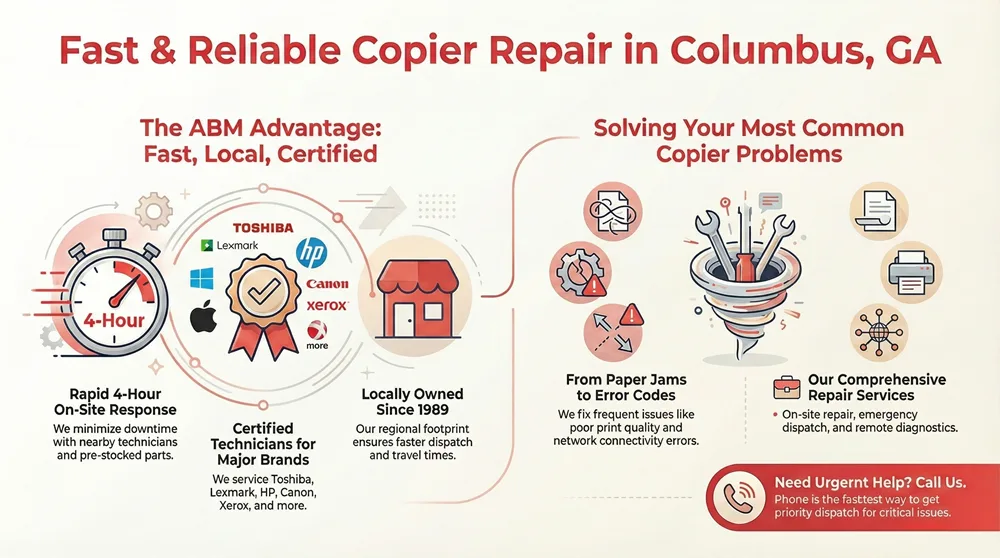
- Certified technicians trained on major copier brands and multifunction devices.
- Fast response and clear service-level expectations to limit business disruption.
If you’re also considering new equipment, see our current product catalogs for models and specs.
These advantages lead naturally to a local option that demonstrates them. Automated Business Machines — locally owned since 1989 — offers certified repairs, managed print services, and leasing and sales. Our model focuses on rapid on-site response and manufacturer support so Columbus offices can resume normal operations sooner. The sections that follow explain how we achieve quick response and list the brands our technicians commonly service.
Although this guide centers on Columbus, we also support nearby markets. For Atlanta customers, a dedicated Atlanta copier lease quote is available.
How Does ABM Ensure Rapid 4-Hour Response Times?
Fast response depends on technician proximity, stocked parts, remote diagnostics, and priority scheduling. Dispatch routes nearby technicians based on real-time availability and parts inventory, while remote tools let us identify likely causes before we arrive. Urgent requests move up priority queues so mission-critical workflows get immediate attention. Our technicians carry common consumables and replacement parts to resolve many issues on the first visit. Together, these practices shorten mean time to repair and reduce lost work hours for our customers.
Managing spare parts and routing technicians efficiently is a key operational factor in meeting aggressive response targets.
On-Site Maintenance & Spare Parts Logistics
This paper addresses the multiperiod integrated spare parts and tour planning problem for a single technician visiting geographically distributed customers for on-site maintenance activities with stochastic repair requests.
Which Major Copier Brands Does ABM Support?
We work with established copier and printer manufacturers so our technicians can service common models and source parts quickly. Our teams are trained on brands such as Toshiba, Lexmark, HP, Canon, and Xerox, covering multifunction printers, laser copiers, and document imaging systems in small and large offices. Brand-specific experience speeds troubleshooting for control-panel error codes, imaging-unit failures, and fuser or feed assembly problems, and supplier relationships help secure replacement parts faster. Technicians versed in these manufacturers reduce misdiagnosis and follow predictable, manufacturer-aligned repair paths.
What Comprehensive Copier and Printer Repair Services Are Available in Columbus, GA?
Full-service copier repair includes remote diagnostics, on-site repair, parts replacement, emergency response, and managed print services that align machines with how your office works. Service channels vary: remote troubleshooting can resolve many configuration and driver issues, on-site technicians handle mechanical and consumable replacements, and emergency channels provide priority dispatch for mission-critical equipment.
Each channel has different response windows and scopes to match urgency and complexity.
| Service Channel | Typical SLA / Response | Typical Problems Addressed |
|---|---|---|
| Remote Diagnostics | Same business day, immediate in many cases | Driver settings, network printing, error-code triage |
| On-Site Repair | Average 4-hour response for certified cases | Paper path repairs, fuser/roller replacement, control panel faults |
| Emergency / Priority Dispatch | 1-4 hour escalation windows | Complete device failure, production bottlenecks, critical unit downtime |
This table helps you decide which channel to request depending on whether the issue is configuration-related, mechanical, or production-stopping. The next section explains how on-site repair drives business efficiency.
How Does On-Site Copier Repair Improve Business Efficiency?
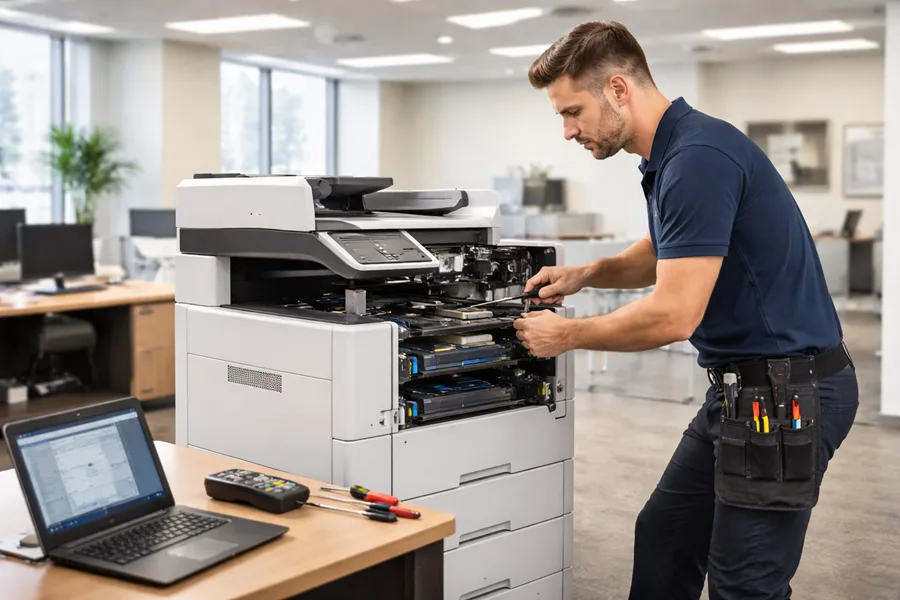
On-site repair reduces disruption by bringing both expertise and parts to the device, avoiding the time and risk of moving bulky equipment. Technicians inspect paper feed assemblies, imaging drums, and developer units in person, perform immediate part swaps or temporary fixes, and reconfigure settings to match your workflows. This local approach shortens downtime, prevents document backlogs, and lets staff continue core tasks with minimal interruption. Knowing these benefits makes it easier to decide when to escalate from remote help to an on-site visit.
What Emergency Copier Repair Options Does ABM Provide?
Our emergency options prioritize critical devices and use escalation rules to speed dispatch and parts allocation during outages. Priority scheduling sends certified technicians with required parts to high-impact machines, and temporary solutions — like loaner units or expedited consumables — keep workflows moving until a permanent repair is finished. Intake and triage procedures ensure the most disruptive issues are handled first, and clear escalation paths speed decisions when specialized parts or technicians are needed. When you request urgent service, sharing device details and operational impact helps us prioritize and resolve the issue faster.
What Are the Most Common Copier and Printer Problems in Columbus, GA?
Office imaging equipment typically shows predictable failures caused by wear, depleted consumables, user error, or network settings. Frequent problems include paper jams and feed issues, control-panel error codes, degraded print quality (streaks, faded or dark prints), and connectivity errors that block network printing. Recognizing these common modes helps technicians triage quickly and often lets staff perform temporary fixes that restore basic function. The table below gives an immediate troubleshooting baseline so non-technical staff know when to escalate to certified repair.
| Problem | Symptoms | Quick Fix / When to Call Technician |
|---|---|---|
| Paper jams / feed issues | Repeated jams, misfeeds, tray errors | Check paper type and tray alignment; call a technician if jams recur after clearing |
| Error codes / control panel faults | Persistent code display, device lockouts | Power-cycle and consult the manual; call a technician for persistent or safety-related codes |
| Print quality problems | Streaks, ghosting, faded output | Replace toner or clean the imaging drum; call tech if issue persists after consumable swaps |
| Network/print spool errors | Jobs stuck, printer not visible | Restart the spooler or reconnect the network; call for persistent network or authentication failures |
This quick-reference table helps staff perform immediate triage and clarifies which symptoms need professional attention. The sections that follow offer practical troubleshooting tips for two frequent issue types.
How Can Paper Jams and Error Codes Be Quickly Resolved?
Paper jams and error codes often come from simple mechanical or user-configuration issues and can be fixed with a few basic checks before calling for service. Start by clearing visible jammed media from the paper path, confirm tray settings and paper size/type, and power-cycle the machine to reset transient errors. If a code persists or a safety interlock is triggered, escalate to a certified technician to avoid damage. Preventive steps — using manufacturer-approved media, storing paper in controlled humidity, and avoiding overfilled trays — reduce recurrence and improve reliability.
What Causes Print Quality Issues and How Are They Fixed?
Print quality problems usually result from low or contaminated consumables, dirty imaging components, or misaligned drum and fuser parts. Diagnosis begins with a visual inspection and test prints. Clean the paper path and imaging areas, replace low/expired toner cartridges, and run manufacturer-recommended calibration and cleaning cycles. If streaking or ghosting remains after those steps, a technician may replace the drum unit, fuser, or developer assembly and recalibrate density settings. Regular maintenance lowers the frequency of these failures and prolongs imaging unit life.
How Do Copier Maintenance Plans in Columbus, GA Prevent Costly Repairs?
A maintenance plan combines scheduled preventive visits, priority response SLAs, and parts or labor coverage to reduce unexpected breakdowns and control operating costs. Preventive maintenance targets critical components — feed assemblies, imaging drums, and fuser elements — and includes recalibrations that keep print quality steady. Predictable service intervals and covered parts lower the chance of catastrophic failures and let businesses budget service costs instead of facing surprise repair invoices. Below is a comparison of typical maintenance tiers to help managers match coverage to fleet size and usage.
| Plan Tier | Visit Frequency | Parts Coverage | Ideal Use Case |
|---|---|---|---|
| Basic | Quarterly visits | Consumables only | Small office with low monthly volume |
| Standard | Monthly visits | Consumables + select parts | Medium fleet with moderate usage |
| Premium | Bi-weekly or as-needed | Broad parts & priority response | High-volume production environments |
This table shows how more frequent service and broader parts coverage reduce downtime risks and extend device life. The following sections outline direct benefits and how contracts usually work.
What Are the Benefits of Regular Copier Maintenance?
Regular maintenance lowers unexpected breakdowns by addressing wear points before they fail, which reduces repair frequency and total cost of ownership. Routine cleaning and recalibration preserve print quality, cut waste and reprints, and scheduled inspections spot developing mechanical problems early. Businesses also gain predictable uptime and easier budgeting through fixed maintenance schedules. For teams that rely on printing and scanning every day, these benefits make maintenance a smart investment.
Understanding long-term wear and costs is essential for evaluating the true total cost of ownership for electromechanical devices.
Total Cost of Ownership & Preventive Maintenance
Electromechanical devices are prone to wear and component degradation. Usage period and preventive maintenance are major drivers of total cost of ownership.
How Do Service Contracts Work for Columbus Businesses?
Service contracts spell out coverage—labor, consumables, parts, and preventive visits—along with response-time SLAs and billing options, which may include per-incident charges or flat monthly fees. Contracts usually list exclusions, escalation steps, and upgrade options as fleet needs change. Choose a tier based on fleet size, device age, and monthly page volumes so coverage is cost-effective and responsive. Clear contract language and measurable performance metrics help avoid billing surprises and keep service consistent.
How Can Columbus Businesses Request a Copier or Printer Repair Quote?
Requesting a repair quote or scheduling service should be simple: give device details, describe the issue, and state urgency so providers can triage and respond. Typical intake asks for make/model and serial number, a brief symptom description, and any photos or error codes; that information speeds diagnostic triage and helps estimate an ETA. Use the checklist below to get a fast, accurate quote with expected costs and scheduling options.
- Describe the issue: Note symptoms, error codes, and which functions are affected.
- Provide device details: Include make, model, and serial number to speed diagnostics.
- Submit photos or logs: Images of the error screen or jammed paper path clarify the problem.
- State urgency and impact: Tell us if the device supports critical workflows to prioritize response.
- Receive quote and ETA: Expect a diagnostic follow-up that outlines likely costs and scheduling options.
Following these steps helps technicians arrive prepared and often shortens on-site resolution time. The next sections describe the online quote process and how to get immediate help for urgent issues.
What Is the Process for Getting a Free Repair Quote Online?
To get a free online quote, complete the request form or contact us with device and issue details. A technician will perform remote triage and send a written estimate and ETA. Providing model and serial numbers, a clear issue description, and photos speeds assessment and helps determine whether a remote fix or on-site visit is required. Turnaround for a preliminary quote depends on request volume and urgency; priority dispatch is available for critical equipment. Clear intake information reduces back-and-forth and gets you a faster appointment.
How Can Customers Contact ABM for Immediate Service?
For urgent requests, call us — phone is the fastest way to start priority dispatch and escalate repairs based on operational impact. Automated Business Machines keeps a direct line for immediate assistance and triage; calling with device details, error codes, and a description of the business impact helps technicians prioritize and prepare. Online request forms and our business profile are fine for non-urgent inquiries and quotes, but phone contact is best for emergency dispatch so we can get the right parts and techs to you quickly.
Frequently Asked Questions
What should I do if my copier is still under warranty?
If your copier is under warranty, contact the manufacturer or their authorized service provider for repairs. Warranty coverage normally includes parts and labor for defects not caused by user error. Have your warranty documentation and the copier’s serial number ready to speed service and avoid unnecessary charges.
How can I extend the lifespan of my copier?
Regular maintenance is the best way to extend copier life. Enroll in a maintenance plan that includes routine cleaning, timely replacement of consumables (toner, drums), and periodic professional servicing. Use the machine within its recommended capacity, avoid heavy back-to-back print jobs, and keep the unit in a clean, climate-controlled area to reduce dust and humidity damage.
What are the signs that my copier needs immediate repair?
Signs you need immediate repair include persistent paper jams, error codes that don’t clear after a power cycle, unusual noises, and a sharp decline in print quality. If the unit won’t respond to commands or appears to overheat, contact a technician promptly to prevent further damage.
Can I perform basic maintenance on my copier myself?
Yes. You can handle basic tasks like cleaning the exterior, replacing toner cartridges, and clearing paper jams. Regularly inspect and clean paper feed rollers and keep the machine dust-free. For internal adjustments or complex repairs, call a certified technician to avoid voiding warranties or causing damage.
What should I consider when choosing a maintenance plan for my copier?
When selecting a maintenance plan, consider your monthly print volume, the machine’s age, and your budget. Compare visit frequency, what parts and consumables are covered, and guaranteed response times. Choose a plan that matches your usage patterns and provides enough support to minimize downtime and unexpected costs.
How can I troubleshoot connectivity issues with my networked copier?
Start by checking network cables and connections. Restart the copier and your router to refresh the network. Confirm the copier’s IP address and ensure it’s on the same network as your computers. If problems continue, consult the copier manual for network settings or contact a technician for further diagnosis.