
Atlanta, GA Copier & Printer Repair — Local, Expert Service for Business Equipment
Businesses across Metro Atlanta depend on reliable copiers and printers to keep work moving. This guide lays out how professional repair, onsite service, managed print programs, leasing, and maintenance contracts work together to cut downtime, control costs, and extend equipment life. You’ll find clear decision frameworks for repair versus replacement, a catalog of common commercial services, and an overview of managed print services (MPS) that streamlines supplies, monitoring, and billing.
We cover frequent failure modes, typical service types, leasing comparisons, and contract features so operations and procurement teams can choose the right path for their fleet. Throughout, local search terms like onsite copier repair Atlanta, commercial copier repair Atlanta, managed print services Atlanta, and emergency printer repair Atlanta reflect the practical, local focus of this advice.
What Are the Key Benefits of Copier Repair Services in Atlanta?
Professional copier repair gets machines back to work quickly while protecting long-term value through targeted fixes and preventive care. The process is methodical: certified technicians diagnose root causes, authorized parts restore performance, and testing confirms output quality. That mix delivers dependable uptime and consistent document production for your team. The tangible benefits include fewer interruptions, lower lifecycle costs compared with ad-hoc fixes, better print quality for client-facing materials, and extended equipment life that delays disruptive capital purchases. Knowing these advantages helps managers decide when to invest in service contracts and certified technicians to support continuity and productivity.

The primary benefits are:
- Less downtime thanks to faster diagnosis and repairs so your office stays productive.
- Lower total cost of ownership when repairs extend usable life and avoid unnecessary replacement.
- Consistent, client-ready print quality that reduces reprints and wasted supplies.
- Predictable outcomes through SLAs and certified technician procedures.
- Brand-agnostic support that keeps mixed fleets running without vendor lock-in.
These benefits frame the choice between reactive repairs and proactive maintenance, and they lead into why fast onsite response matters for daily operations. The next section looks at how onsite repairs are handled and typical timelines.
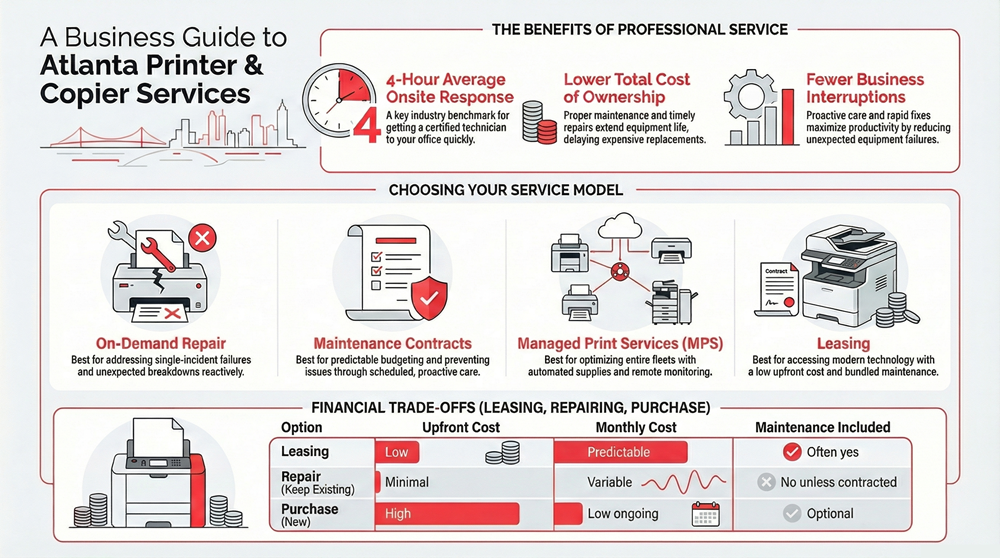
Automated Business Machines (ABM) is a local example of this model in practice. ABM performs certified repairs across major brands and reports an average four-hour response time from certified specialists — a useful benchmark for businesses weighing response metrics and technician credentials alongside cost when assessing likely uptime improvements.
How Does Fast Onsite Copier Repair Minimize Business Downtime?
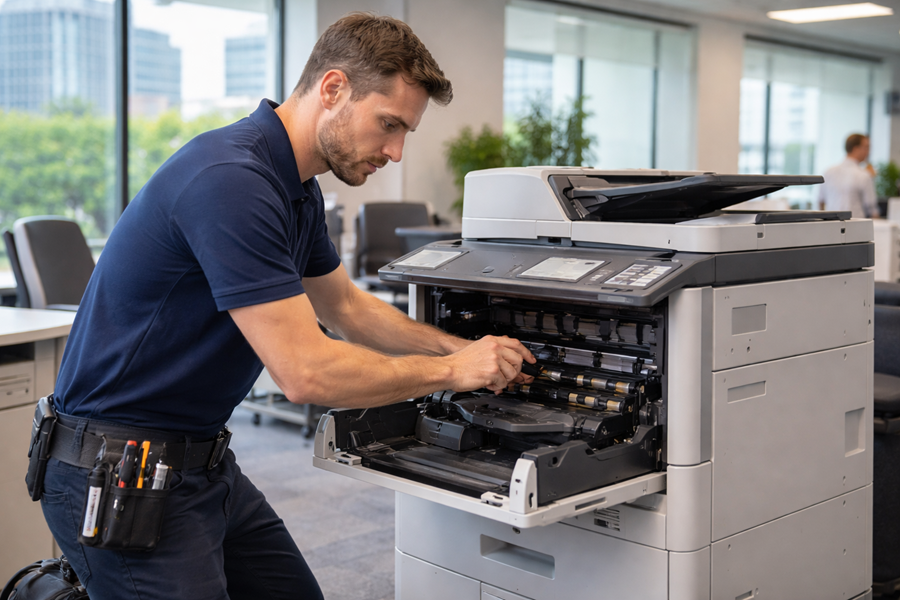
Fast onsite repair shortens the time from problem discovery to resolution — often from days to hours — by keeping diagnosis, parts swaps, and validation at your location. Technicians use immediate fault isolation, temporary workarounds for critical tasks, and same-day parts replacements when available. That reduces the need to ship devices offsite and preserves continuity for high-volume printing needs. Paired with clear SLAs, rapid onsite service delivers predictable recovery times and fewer lost billable hours.
A typical rapid-repair flow: remote triage within an hour, onsite arrival for a full diagnostic, same-day parts swap or temporary workaround when possible, and a final validation with the user. That sequence minimizes total downtime and supports continuity plans with defined recovery steps and short-term alternatives if parts must be ordered.
Which Common Copier Issues Do Atlanta Businesses Face?
Local businesses most often report mechanical and connectivity problems: persistent paper jams, worn feed rollers, toner or fuser faults that cause streaks or smudges, and network authentication or driver issues that interrupt digital workflows. Each problem follows a diagnostic path: mechanical jams usually point to rollers or tray alignment, print quality issues often trace to toner distribution or fuser temperature, and network/firmware faults resolve with configuration changes or controlled firmware updates from a technician. Recognizing these patterns lets operations teams give helpful context to techs and prioritize preventive work.
Quick troubleshooting steps that help before a technician arrives: clear accessible paper paths, confirm network connections and DNS settings, keep spare toner for high‑volume devices, and note recurring error codes. Doing this shortens mean time to repair by giving technicians a head start on the most likely fixes.
Which Printer Repair Services Are Available for Atlanta Businesses?
Commercial printer repair covers diagnostics, parts replacement, onsite repairs, firmware and driver support, and emergency response for mission‑critical failures. Technicians follow systematic fault analysis and targeted corrective actions — from replacing rollers and fusers to updating firmware or fixing network authentication — to restore device capability and consistent output. Businesses can choose single-incident repairs, recurring preventive maintenance, or hybrid contracts that mix scheduled visits with emergency coverage based on usage. Knowing available service types helps managers write clear procurement specs and compare vendor proposals.
Common printer repair services include:
- Diagnostic service — structured fault identification and a root-cause report to plan repairs.
- Parts replacement — OEM or authorized parts fitted to restore mechanics and print quality.
- Onsite repair — technicians fix devices at your location to avoid shipping delays.
- Emergency repair — rapid-response support for critical device failures during peak periods.
These categories form a decision matrix for repair versus contract buying. The table below highlights attributes procurement and operations teams should review.
Intro to service comparison table: The table below compares common printer repair offerings using practical attributes that matter to procurement and operations teams, such as response time, onsite capability, cost range, and brands supported.
| Service Type | Typical Response Time | Onsite or Remote | Typical Cost Range | Brands Supported |
|---|---|---|---|---|
| Diagnostic Service | 2–24 hours depending on SLA | Remote or onsite | Low–Moderate | All major brands |
| Parts Replacement | 4–72 hours depending on part availability | Onsite | Moderate–High | OEM and brand-agnostic |
| Onsite Repair | 1–8 hours with expedited SLA | Onsite | Moderate | Laser, inkjet, MFDs |
| Emergency Repair | 1–4 hours with emergency SLA | Onsite | High | Mission-critical devices |
Use this comparison to prioritize services by urgency, device criticality, and budget. The right mix of diagnostics, parts access, and onsite capability reduces downtime and overall repair spend.
What Printer Brands Does ABM Repair in Atlanta?
ABM services a wide range of major printer and copier manufacturers and maintains authorized dealer relationships with selected vendors. See our product catalogs for specifics. ABM lists authorized dealer status for Toshiba, Lexmark, and HP, which ensures direct parts access and manufacturer-aligned repair procedures for those lines. For other brands, certified technicians apply standard diagnostic and repair protocols so mixed fleets can be managed through a single provider — helping reduce administrative overhead for businesses with diverse equipment.
Authorized dealer status gives procurement teams confidence about parts authenticity and repair workflows. For non-dealer brands, certified technicians rely on proven procedures to maintain performance and reliability.
How Do Certified Technicians Ensure Reliable Printer Repairs?
Certified technicians deliver reliable repairs through formal training, calibrated diagnostic tools, authentic parts sourcing, and standardized post-repair testing before sign-off. Training teaches error-code interpretation, mechanical adjustments, and firmware updates while keeping devices within manufacturer tolerances. After a repair, technicians run validation checks — page-quality tests, network printing trials, and throughput simulations — to make sure devices perform under expected loads. This QA-led approach reduces repeat visits and provides clear documentation for asset management and warranty support.
Technician best practices also include parts authenticity checks and inventory controls to prevent substandard replacements. Ongoing training ensures techs stay current on new models and firmware so they apply up‑to‑date repairs across makes and device classes. Reliable repair workflows naturally tie into managed print strategies that prevent many repair triggers before they happen.
How Can Managed Print Services Optimize Office Equipment in Atlanta?
Managed print services (MPS) centralize device monitoring, supplies management, and service coordination to lower per-page costs, boost uptime, and simplify billing for multi-device fleets. MPS deploys monitoring agents and usage reporting, applies proactive maintenance schedules, and consolidates supplies ordering with a single provider — reducing emergency repairs and bringing more predictable operating budgets. The result: measurable savings on supplies and labor, fewer interruptions through preventive work, and clearer visibility into document workflows and device utilization. Understanding core MPS features helps teams estimate savings and decide which devices to include in a managed program.
Key, measurable MPS benefits:
- Lower per-page costs through centralized supplies procurement and consistent usage policies.
- Fewer emergencies thanks to proactive maintenance and early fault detection via remote monitoring.
- Simpler billing and less admin time by consolidating invoices and support contacts.
These advantages make a strong ROI case for MPS. The table below ties features to likely outcomes and typical SLA options.
Intro to MPS features table: The following EAV-style table maps managed print features to measurable benefits and common SLA options to help estimate value.
| MPS Feature | Benefit | Typical Outcome |
|---|---|---|
| Remote Monitoring | Early fault detection | 20–40% fewer emergency repairs |
| Automated Supplies Fulfillment | Reduced stockouts | 10–20% lower supply costs |
| Centralized Billing | Administrative simplification | Less invoicing overhead |
| Custom SLAs | Priority response and uptime guarantees | Faster mean time to repair |
Use these outcomes to compare vendors on tangible results rather than promises alone. The next section explains typical cost savings and an illustrative ROI scenario.
What Cost Savings and Efficiency Benefits Do Managed Print Services Offer?
MPS saves on supplies, labor, and downtime by standardizing fleets, negotiating bulk pricing, and preventing unexpected service events with scheduled care. For midsize fleets, common gains include lower per-page costs from standardized consumables, less internal helpdesk time, and fewer emergency service calls. Efficiency also comes from usage policies and fleet right‑sizing, which place devices where they’ll be used most and retire underutilized machines. These effects often produce a clear ROI within a year when volume is managed and policies are enforced.
Illustrative ROI: consolidating supplies and adding remote monitoring across 30 devices can reduce per-page costs by double-digit percentages and cut emergency visits significantly, yielding direct savings on supplies and indirect labor savings. That’s why many organizations prioritize MPS when fleet complexity and print volume justify central control. ABM’s managed print and managed IT offerings provide a local example of integrated delivery.
How Does ABM Tailor Managed Print Solutions for Atlanta Businesses?
ABM starts with an inventory and usage assessment, then designs a customized MPS plan aligned with company size and document workflows. Deployments include monitoring-enabled devices, SLAs set to local priorities, and optional integration with managed IT to address network issues that affect printing. Bundling print and IT simplifies vendor management and speeds troubleshooting. For teams that want a single provider to manage both device lifecycle and network reliability, an integrated MPS+IT model can be a strong fit.
An assessment-driven approach helps align SLAs to actual needs and produces clearer cost predictability — which is the foundation for the leasing and repair comparisons that follow.
What Copier and Printer Leasing Options Support Atlanta Businesses?
Leasing options are an alternative to buying outright: they reduce upfront capital, enable regular equipment refreshes, and often include maintenance in the monthly payment. Leasing transfers replacement risk to the lessor and can bundle service so maintenance costs are predictable. When weighing leasing against repair or purchase, evaluate lifecycle costs, expected utilization, upgrade flexibility, and how maintenance is handled. Leasing is especially useful for businesses expecting technology change or preferring operating expense treatment instead of capital expenditure.
Typical leasing advantages include lower initial cash outlay, scheduled refresh cycles, and the option to include maintenance for simpler procurement. These benefits should be weighed against repair thresholds and expected repair frequency to determine the best path. The table below compares leasing, repair, and purchase across the financial and operational factors that matter most.
Intro to leasing comparison table: This table contrasts leasing, repair, and purchase in terms that matter for procurement decisions, such as upfront cost, monthly outlay, maintenance inclusion, and upgrade flexibility.
| Option | Upfront Cost | Monthly Cost | Maintenance Included | Upgrade Flexibility |
|---|---|---|---|---|
| Leasing | Low | Predictable | Often yes | High (scheduled refresh) |
| Repair (Keep Existing) | Minimal | Variable | No unless contracted | Low |
| Purchase (New) | High | Low ongoing | Optional | Low to Moderate |
This comparison clarifies trade-offs and supports a decision framework based on repair frequency and device importance. The next section offers a simple rule of thumb for choosing between leasing and repair.
How Does Leasing Compare to Repair for Office Equipment Needs?
Leasing often beats repeated repairs when cumulative repair costs near a large share of replacement value or when downtime risk outweighs savings from keeping older equipment. A practical rule many teams use: consider leasing or replacement when a single repair costs roughly half of the used replacement value, or when frequent service calls harm operations. Leasing gives predictable monthly expenses and scheduled upgrades that reduce long-term risk for fast-changing environments. Repair makes sense for newer devices with low service frequency or when capital constraints favor postponing replacement.
Operational factors — downtime tolerance, spare-device availability, and upgrade needs — should guide the threshold. Organizations prioritizing uptime and budget predictability usually favor leasing with bundled maintenance; teams managing capital tightly may choose repairs where devices remain cost-effective to maintain.
What Are the Advantages of Leasing from ABM in Atlanta?
Leasing through ABM can include bundled maintenance, local support across Georgia and Alabama, and options to combine managed services for a single-vendor relationship that covers device lifecycle and IT. ABM’s local presence makes onsite coordination and fleet monitoring more efficient, and leasing programs can be aligned with service agreements for simplified budgeting and faster issue resolution. For businesses wanting one partner for financing and operations, combining leasing with managed print or IT reduces administrative overhead and speeds problem resolution.
That brings us to maintenance contracts and how they reduce surprise expenses for equipment fleets.
How Do Maintenance Contracts Enhance Office Equipment Reliability in Atlanta?
Maintenance contracts create predictable service relationships by defining scheduled preventive visits, parts and labor coverage, and priority response procedures that reduce emergency repairs. The core is proactive upkeep — inspections, cleaning, calibration, and early component replacement — which prevents many common breakdowns and steadies per-device operating costs. Contracts also convert variable repair spend into fixed service fees and often include monitoring that flags issues before they become disruptive. Understanding plan features helps teams pick tiers that match device criticality and desired response times.
Industry research reinforces that proactive maintenance is essential to keeping printing equipment reliable and productive.
Optimizing Printing Machine Maintenance & Uptime
Maintenance plays a vital role in production planning and equipment performance. Measuring overall equipment effectiveness helps identify frequent losses — from breakdowns and adjustments to minor stoppages and defects — that reduce output. Applying total productive maintenance principles improves machine reliability, availability, and maintainability, which is critical for print operations where downtime directly impacts targets and efficiency.
Maintenance agreements deliver three core operational benefits: steadier uptime through scheduled care, fewer surprise expenses because parts and labor are covered, and faster response when incidents occur under contract. These outcomes stabilize workflows and simplify asset management by consolidating repair history and upcoming service needs. The table below outlines common maintenance plan features to help compare offerings.
Intro to maintenance plan table: The table below outlines common maintenance plan attributes and the operational benefits they provide for office fleets.
| Plan Feature | Description | Operational Benefit |
|---|---|---|
| Scheduled Preventive Visits | Regular inspections and cleaning | Fewer emergency failures |
| Parts & Labor Coverage | Repairs included under plan terms | Predictable repair costs |
| Priority Response | Faster onsite arrival under SLA | Reduced downtime impact |
| Remote Monitoring | Proactive alerts on faults | Early intervention capability |
Use this breakdown to pick plan elements that match uptime targets and budget constraints. The next section summarizes typical features providers include in maintenance plans.
What Are the Features of ABM’s Copier and Printer Maintenance Plans?
ABM’s maintenance plans commonly include scheduled preventive visits, diagnostic services, parts and labor coverage as defined in the agreement, and priority response procedures to reduce downtime. Regional reporting highlights ABM’s certified technician support and prioritized onsite metrics as part of these plans. Adding remote monitoring and reporting can further lower emergency events by exposing wear patterns before failures occur. Clear plan definitions and documented SLAs are essential to deliver predictable service outcomes and measurable uptime improvements.
These plan features reduce emergency repairs and improve parts forecasting, which drives savings. The next section explains how contracts translate into more predictable repair spend for budgeting teams.
How Do Maintenance Contracts Reduce Unexpected Repair Costs?
Maintenance contracts limit unexpected repair costs by bundling routine service events into predictable fees, covering the parts and labor for covered failures, and catching worn components before they fail. Scheduled inspections and early replacements cut the likelihood of expensive breakdowns. For finance teams, contracts convert variable, unpredictable repair expenses into steady line items that are easier to forecast — especially valuable when uptime impacts revenue or compliance workloads.
Compared with reactive repairs, contracts reduce emergency parts orders, rush shipping fees, and the productivity losses from extended downtime. That cost predictability helps procurement set meaningful SLAs and compare vendors on apples-to-apples terms. The final section answers frequent customer questions about costs and timelines.
What Are Common Questions About Copier and Printer Repair in Atlanta?
Clients often ask about repair costs, response timelines, supported brands, and how to choose between repair and replacement. Good answers present ranges tied to device class, fault severity, and part availability. Response times depend on SLA level and vendor capacity. Whether a vendor is an authorized dealer affects parts authenticity and repair protocol. The short FAQ below covers common cost drivers and timelines, and links to next steps for requesting a precise quote. The first item covers cost expectations and what influences them.
How Much Does Copier and Printer Repair Cost in Atlanta?
Repair costs vary by device class, fault type, parts needed, and whether the work is under contract. Typical cost drivers include replacement parts, technician labor, travel, and emergency surcharges when applicable. Higher costs usually stem from obsolete parts, major assemblies like fusers or drums, and network troubleshooting that requires IT integration. Vendors typically provide an estimate after an initial diagnostic — ask for an itemized quote and compare contract coverage to evaluate value. For binding pricing, request a formal diagnostic and quote from your chosen provider via our diagnostic quote page.
Next is a common question about response times and how they affect recovery planning.
What Is ABM’s Average Response Time for Repair Services?
ABM reports an average onsite response time of four hours from certified specialists in covered areas. A four-hour average helps shorten overall downtime by getting technicians on site quickly to diagnose and, when possible, repair or provide temporary workarounds. For mission-critical devices, response metrics can be decisive in vendor selection and SLA negotiation — confirm expected response times when contracting and align them with internal continuity plans.
That closes our FAQ and ties service-level expectations back to leasing, maintenance contracts, and managed print programs described earlier.
Frequently Asked Questions
What should businesses consider when choosing a copier repair service in Atlanta?
Choose a provider by looking at technician certifications and experience across brands, the SLAs offered (especially response times and coverage), and transparent pricing with itemized quotes. Check customer reviews and references to confirm reliability, and verify emergency support availability for critical situations. Local presence and parts access are also practical differentiators.
How can businesses prepare for a technician’s visit for copier repair?
Before the visit, note any error codes and reproduce the problem if possible. Clear space around the machine for easy access, have network details (IP addresses, credentials) available, alert staff about the appointment, and keep spare toner and paper on hand. These steps help the technician work faster and reduce downtime.
What are the signs that a copier needs repair rather than maintenance?
Signs that a device needs repair include persistent error messages, repeated paper jams, a marked drop in print quality (streaks, smudges), unusual noises, or failure to power on. If service calls are frequent or repair costs are rising, replacement may be more economical than continued maintenance.
What is the typical turnaround time for copier repairs in Atlanta?
Turnaround depends on the issue and part availability. Expect an initial onsite response around four hours on average; many repairs finish the same day when parts are in stock. Complex fixes or special parts can extend turnaround to 24–72 hours. Discuss timelines with your provider during the diagnostic step.
How do managed print services (MPS) impact overall printing costs?
MPS lowers printing costs by optimizing device placement, standardizing supplies, and automating fulfillment. Remote monitoring reduces emergency repairs and helps enforce usage policies, while consolidated billing and fleet right‑sizing cut administrative overhead and per-page expenses.
What are the benefits of having a maintenance contract for office equipment?
A maintenance contract provides predictable budgeting, scheduled preventive care that reduces breakdowns, and parts-and-labor coverage that avoids surprise expenses. Contracts often include priority response times, which helps keep operations running smoothly and preserves productivity.