
AI Overview:
This guide explains how modern document management solutions help Atlanta businesses organize, secure, and automate the full document lifecycle. It covers core DMS capabilities—capture, indexing, search, workflow automation, scanning, and secure storage—showing how they reduce manual work, improve compliance, and support paperless operations. The article also compares on-premise vs. cloud storage, highlights common automated workflows like invoicing and HR onboarding, and outlines practical next steps for Atlanta organizations seeking faster access, stronger security, and audit-ready records.
Atlanta, GA Document Management Solutions — Streamline Your Business Documents
Document management solutions organize, protect, and automate the full lifecycle of your business records so teams can find, share, and act on documents faster — while staying audit-ready. This guide explains what modern document management systems (DMS) do, why they matter for Atlanta organizations, and how capture, storage, workflow automation, and security work together to cut manual work and speed decisions.
You’ll learn how indexing and full‑text search make documents instantly accessible, which workflows are best to automate, practical steps for a paperless office, scanning and QA practices, and the trade‑offs between on‑premise and cloud storage. We also highlight local service factors and the types of partners that help Georgia organizations scan, store, and automate records. If you manage records, oversee compliance, or lead digital transformation at an Atlanta company, this piece lays out options and next steps to streamline documents without losing control or auditability.
For Atlanta businesses needing reliable office equipment, the right hardware matters. If you’re seeking an Atlanta, Georgia copier lease, local providers can tailor solutions to your workflow and budget.
What Are Document Management Solutions and Why Are They Essential for Atlanta Businesses?
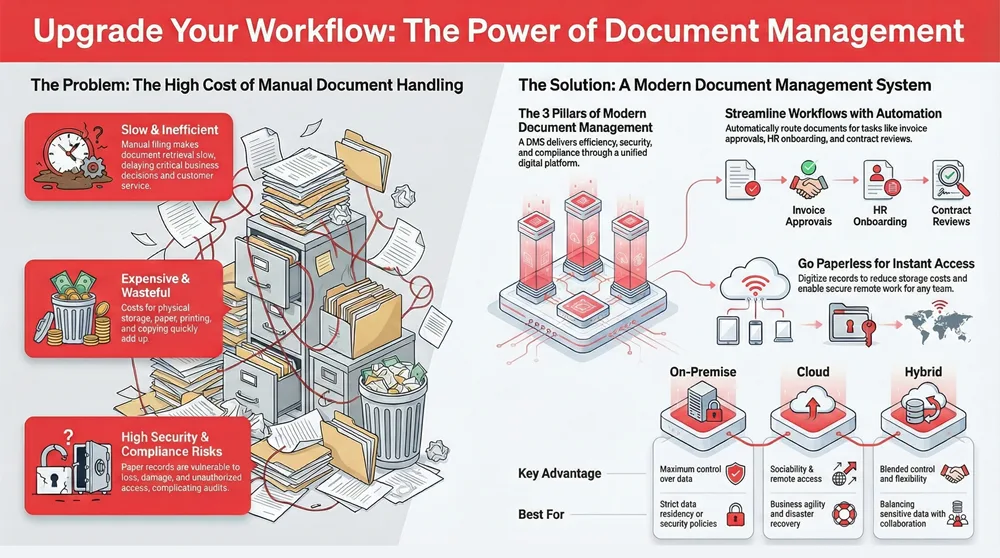
Document management solutions are integrated platforms that capture, index, store, secure, and distribute documents electronically. They speed retrieval, reduce errors, and help you meet regulatory obligations. A DMS captures content via scanning or digital import, applies metadata and indexing, stores files in searchable repositories, and uses access controls plus versioning to preserve integrity. For Atlanta teams facing tight turnarounds, distributed staff, and industry rules, a DMS removes paper bottlenecks and accelerates permitting, contract execution, and cross‑office collaboration. In short, a DMS turns manual filing into automated processes that cut retrieval time, lower storage costs, and create auditable trails.

Below are the core benefits that deliver immediate value to local organizations.
Document management core benefits for Atlanta organizations:
- Efficiency: Faster retrieval and fewer manual steps boost staff productivity and decision speed.
- Security: Role‑based access, encryption, and audit logs protect sensitive records and reduce breach risk.
- Compliance: Retention policies, versioning, and searchable audit trails support HIPAA and other industry requirements.
These fundamentals show how a DMS improves day‑to‑day organization and access for teams across metro Atlanta and statewide.
How Do Document Management Systems Improve Organization and Accessibility?
A DMS uses structured metadata, consistent indexing, and full‑text search so users can pull documents in seconds instead of digging through paper files or long email threads. Indexing assigns searchable fields — like date, client, or contract number — while OCR (optical character recognition) makes the words inside scanned pages searchable. Role‑based access and version control prevent duplicate work and reduce the risk of using obsolete drafts, preserving a single source of truth for audits and collaboration. For example, a signed contract that once took hours to find becomes available in moments, which speeds invoicing, legal review, and follow‑up tasks.
What Are the Key Benefits of Implementing Document Management in Atlanta?
Deploying a DMS yields measurable benefits: lower physical storage costs, faster process times, and stronger disaster recovery through backups and redundancy. Firms that digitize legacy records typically see lower retrieval labor costs and fewer missed deadlines, while digital retention policies make audits smoother. Beyond cost savings, faster document access improves client service and enables remote or field teams to stay productive. Together, these gains support business continuity — digital copies with tested backups remain available even if a physical office is temporarily inaccessible.
How Does Workflow Automation Enhance Document Management in Atlanta?
Workflow automation adds rules and routing on top of your document repository so routine, document‑centric tasks run consistently with fewer handoffs and fewer errors. Automation connects triggers — for example, a scanned invoice or a completed HR form — to actions like approvals, notifications, and archival. By orchestrating routing, validation, and integrations with business systems, automation shortens cycle times, reduces audit friction, and gives managers clear visibility into process status.
The list below highlights common document workflows that automation handles effectively.
Common document workflows that automation typically handles:
- Invoice approvals: Capture invoices, validate fields, route for sign‑off, and post to AP systems automatically.
- HR onboarding: Collect forms, verify IDs, route contracts, and provision access in downstream systems.
- Contract routing: Automate review cycles, capture approvals, and archive signed documents with metadata.
These automated workflows cut time and errors. The next section compares how specific automation tools are applied in practice.
Which Business Processes Can Be Automated with Workflow Solutions?
Workflow tools automate repetitive document tasks across finance, HR, legal, and operations to shorten processing time and reduce manual errors. Invoice processing is high‑impact: automated capture, field extraction, and three‑way matching lower late payments and exceptions. HR onboarding uses capture and routing to get employees productive faster while collecting compliance artifacts. Contract review and signature routing speed negotiations by enforcing consistent review steps and preserving signed records in the DMS.
Specifically, using Robotic Process Automation (RPA) for invoice processing can significantly increase throughput and accuracy.
Automating Invoice Processing with RPA for Business Efficiency
Invoice processing is a common back‑office task that often requires substantial manual effort. Traditional, manual workflows spend time collecting, routing, and verifying invoices. Robotic Process Automation (RPA) offers a faster approach: extract invoice data, sort by due date, and populate team spreadsheets or AP systems automatically. Advanced solutions can recognize a wide variety of real‑world invoice formats and pull key values to support accounts payable and expense controls. The result is faster invoice processing with fewer errors — many systems can process hundreds of invoices per day, far beyond manual capacity.
Invoice processing using robotic process automation, 2020
The table below summarizes typical workflows using a simple trigger → action → value view to clarify how automation delivers business impact.
| Workflow | Trigger | Business Value |
|---|---|---|
| Invoice Approval | Invoice capture or vendor email | Shorter AP cycles, fewer late fees, reduced manual entry |
| HR Onboarding | New‑hire packet submission | Faster provisioning, consistent compliance, reduced HR labor |
| Contract Review | Draft uploaded or signature requested | Faster negotiation cycles and reliable audit trail |
This comparison shows automation focuses on predictable triggers and measurable gains, which leads into a discussion of the software platforms that enable these capabilities.
How Do Questys, DocForm, and Encompass Software Facilitate Workflow Automation?
Questys, DocForm, and Encompass each offer modular features that combine capture, indexing, and routing to support automated document lifecycles. Questys is known for strong organization and search with workflow modules that route documents for review and approval. DocForm excels at form capture and intelligent routing, turning submitted forms into actionable workflows with little manual intervention. Encompass provides enterprise orchestration, integrating documents and workflows with other systems for broad automation and reporting. These platforms include templates, connectors, and configurable rulesets so teams can automate routine work quickly; vendors are typically chosen based on integration needs and scale.
What Are the Advantages of Paperless Office Solutions for Atlanta Companies?
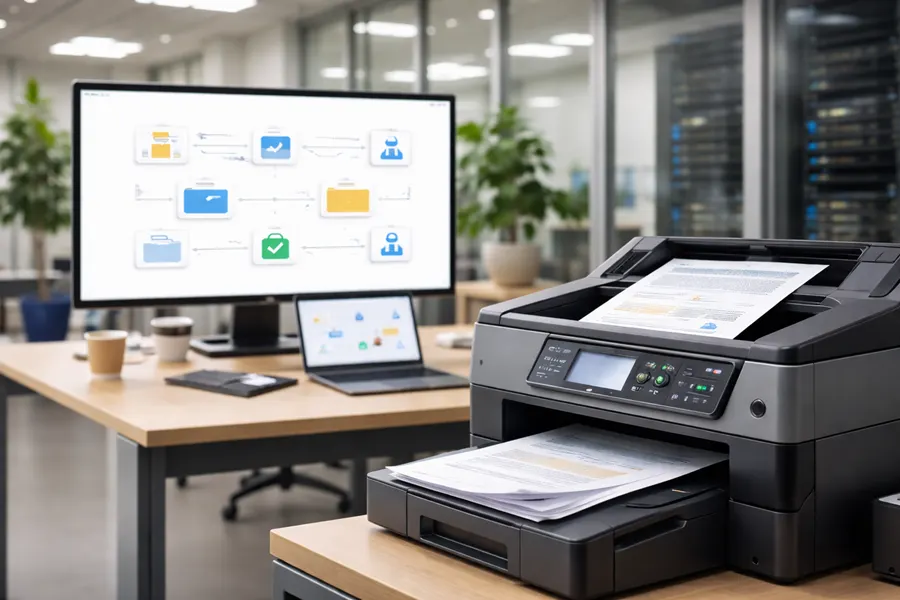
Paperless office solutions cut reliance on physical documents by digitizing capture, routing, and storage. The result: lower storage costs, faster processes, and better support for remote or hybrid teams. Going paperless lets staff search instantly, collaborate simultaneously, and reduce expenses from printing, copying, and courier services. It also supports sustainability goals by reducing paper consumption and the carbon footprint tied to storage and transport.
Key advantages of moving to a paperless office:
- Cost savings from reduced printing, paper, and physical storage.
- Faster operations through instant access, search, and remote collaboration.
- Environmental benefits from lower paper use and waste.
- Stronger security via centralized access controls and encryption.
These benefits make a strong case for pilots and phased rollouts, which we describe next to help teams plan practical transitions.
How Can Businesses Transition to a Paperless Office Effectively?
A successful paperless transition follows a staged approach: audit your documents, pick a high‑value pilot (AP or HR often work well), define metadata and retention rules, set up scanning and capture workflows, train users, and measure results to refine the rollout. Start small to prove ROI, validate indexing, and confirm user acceptance before scaling. Governance matters: standardized naming conventions, metadata schemas, and retention schedules ensure consistent results and steady adoption. Combining technology deployment with change management and a measured rollout minimizes disruption and embeds more efficient ways of working.
What Environmental and Cost Benefits Does Going Paperless Offer?
Going paperless reduces long‑term facility and storage costs by limiting off‑site records storage and freeing up office space. Lower printing and consumables deliver direct savings, while digitized workflows cut fulfillment time and related labor costs — improving margins for document‑intensive processes. Environmentally, less paper means fewer upstream emissions from pulp and paper production and less waste to manage, supporting corporate sustainability goals. For many mid‑sized offices, the multi‑year savings in storage and labor justify the initial scanning and indexing investment.
What Document Scanning Services Are Available in Atlanta and How Do They Support Digital Transformation?
Document scanning services convert paper records into searchable digital files, supporting day‑forward capture and large backfile conversions to unlock legacy archives. Scanning usually includes OCR, quality assurance, indexing, secure handling, and optional microfilm conversion for archival media. High‑quality providers follow chain‑of‑custody procedures, use calibrated equipment for consistent image quality, and apply standardized metadata so scanned records integrate smoothly into a DMS.
The table below compares common scanning types, typical turnarounds, and indexing approaches to help you choose the right path.
| Scanning Type | Use-case | Turnaround & Indexing |
|---|---|---|
| Day‑forward scanning | Ongoing capture at the point of origin | Immediate capture with basic indexing |
| Backfile conversion | Legacy records and archives | Project‑based turnaround with detailed indexing |
| Microfilm conversion | Long‑term archival media migration | Specialized conversion with high‑resolution indexing |
This comparison clarifies how scanning modes fit into broader digital transformation plans and introduces the services a local partner typically provides.
What Types of Document Scanning Does ABM Provide?
Automated Business Machines (ABM) offers both day‑forward scanning and large backfile conversion services across Georgia and Alabama. Day‑forward capture integrates with multifunction printers for ongoing intake, while backfile projects convert legacy archives into indexed, searchable files ready for DMS ingestion. Turnaround depends on project scope; indexed outputs range from simple folder‑level tags to field‑level metadata with OCR for full‑text search. When evaluating a scanning partner, start with document volume estimates, indexing needs, and integration targets to scope a phased migration.
How Is Secure Handling and Indexing Ensured During Scanning?
Secure scanning enforces chain‑of‑custody and controlled access so documents stay protected from pickup through processing and delivery. Providers use encrypted transport where appropriate and perform QA checks on images and OCR accuracy. Standardized indexing templates ensure consistent metadata for reliable search and retention. Retention rules and audit logs help ensure scanned records meet compliance requirements and maintain evidentiary integrity for legal or regulatory review. These practices prepare scanned records for whatever storage and access controls you choose next.
How Does Digital Document Storage Ensure Security and Accessibility for Atlanta Businesses?
Digital storage balances security and accessibility through deployment choice, encryption, role‑based access, and redundancy so organizations meet operational needs and compliance obligations. Options — on‑premise, private cloud, and public cloud — differ by control, cost model, scalability, and accessibility. Select based on regulatory needs, IT capacity, and growth expectations. Security features like encryption at rest and in transit, multi‑factor authentication, and detailed audit logs reduce breach risk and support response efforts.
The following table compares core storage options across security, cost, and accessibility to guide decision‑making.
| Storage Option | Security & Control | Cost & Accessibility |
|---|---|---|
| On‑premise | Maximum control and local governance | Higher capital cost, limited external accessibility |
| Private Cloud | Strong control with managed hosting | Moderate cost, scalable with restricted access |
| Public Cloud | Built‑in scalability and broad access | Lower CAPEX, pay‑as‑you‑go operating costs |
This overview helps teams align storage choice with compliance and IT maturity, and leads into the security features that protect stored documents.
What Are the Differences Between On‑Premise and Cloud Storage Options?
On‑premise storage keeps infrastructure and data local, which is useful when strict data residency or security policies apply. Cloud storage delivers rapid scalability, reduced capital expense, and built‑in redundancy for easier backups and disaster recovery, making it attractive for teams focused on agility. Many organizations adopt hybrid models: keep the most sensitive archives on‑site and use cloud for day‑to‑day collaboration. Your decision should consider expected growth, uptime needs, and integration with existing enterprise systems.
How Do Security Features Like Encryption and Access Control Protect Documents?
Encryption at rest and in transit prevents unauthorized reading of stored or transmitted documents. Role‑based access control and multi‑factor authentication ensure only authorized users can retrieve sensitive files. Audit logs and immutable versioning create an evidentiary trail for compliance reviews and investigations. Regular backups and tested recovery procedures guard against hardware failure and ransomware. Together, these controls form a layered defense that preserves confidentiality, integrity, and availability, and—when combined with retention policies—meets operational and regulatory needs.
Research into long‑term storage technologies further supports a comprehensive approach to protecting digital assets over time.
Long‑Term Digital Document Storage & Management Technology
This study focuses on technologies for long‑term digital document storage. It reviews current solutions, defines the challenges of long‑term preservation, and presents models for estimating storage parameters in changing environments. The authors describe algorithms and monitoring approaches to maintain digital document integrity and give examples of implementations within large information systems. The proposed technology aims to comprehensively address the scientific and technical problems of long‑term digital preservation and outlines plans for handling big data and distributed registry systems.
Long‑term digital documents storage technology, 2019
What Security and Compliance Measures Are Critical in Atlanta Document Management?
Key security and compliance measures include access controls, encryption, retention policies, auditability, and an incident response plan to address breaches and regulatory inquiries. Organizations should map relevant regulations for their sector and implement technical and organizational measures that support audits, data subject rights, and secure disposal. Regular risk assessments, staff training on document handling, and continuous monitoring for unusual activity are essential to a defensible compliance posture. The following sections explain how a local partner can help and outline specific practices that mitigate common document‑related risks.
Research also highlights core motivations and measures for protecting electronic documents throughout their lifecycle.
Electronic Document Security for Regulatory Compliance
This paper examines the importance of securing electronic documents in online business processes. It identifies three primary reasons organizations invest in document security: meeting regulatory requirements, achieving ROI through automation, and protecting sensitive information. The study outlines persistent security measures — confidentiality, authorization, accountability, integrity, authenticity, and non‑repudiation — and surveys technologies such as document control systems and digital signatures to enhance security across a document’s lifecycle.
A study of electronic document security, 2014
How Does ABM Ensure Regulatory Compliance with HIPAA and GDPR?
Automated Business Machines (ABM) helps clients align document handling and managed IT controls with regulatory expectations like HIPAA and, where relevant, GDPR. ABM emphasizes secure capture, controlled storage, traceable audit logs, and retention enforcement to support audit readiness. Technical controls are one part of compliance — ABM also advises on processes and integration points so your document lifecycles reflect policy requirements. These services support your compliance program but do not replace formal legal or compliance review.
What Data Security Practices Mitigate Risks in Document Management?
A practical checklist reduces risk across capture, storage, and access: encrypt data in transit and at rest, require multi‑factor authentication, keep regular backups and test recovery procedures, perform periodic access reviews, and train employees on secure document handling. Monitor for anomalous access patterns and apply retention and secure disposal processes to limit exposure from outdated records.
The list below summarizes core practices to harden your document environment.
- Encrypt documents both in transit and at rest to prevent unauthorized disclosure.
- Use multi‑factor authentication and role‑based access to control retrieval.
- Maintain automated backups and regularly test recovery procedures to ensure availability.
- Conduct regular access reviews and provide ongoing employee training to reduce insider risk.
Together, these practices create layered defenses that support regulatory obligations and operational resilience for document management systems.
Frequently Asked Questions
What factors should Atlanta businesses consider when choosing a document management solution?
When choosing a document management solution, evaluate scalability, integration with your existing systems, ease of use, and compliance with local and industry regulations. Consider the level of vendor support, security features (encryption, access controls), and total cost of ownership, including implementation and ongoing fees. Also review vendor experience and references to ensure a reliable long‑term partner.
How can businesses measure the ROI of implementing a document management system?
Measure ROI by tracking quantitative and qualitative improvements: reduced physical storage costs, time saved on document retrieval, and lower labor costs from manual processing. Also account for improved audit readiness, faster customer response times, and higher employee productivity. A before‑and‑after analysis of these metrics gives a clear view of the DMS’s financial and operational impact.
What are the common challenges businesses face when transitioning to a paperless office?
Common challenges include change resistance from staff, the need for comprehensive training, and potential disruption during migration. Technical hurdles may include data migration, ensuring document security, and designing effective workflows. To reduce risk, build a clear transition plan, engage stakeholders early, run a focused pilot, and provide ongoing training and support.
How does document management support remote work for Atlanta businesses?
A DMS supports remote work by providing secure, centralized access to digital documents from anywhere. Teams can collaborate in real time, share files securely, and rely on version control to work with the latest documents. Automated workflows help distributed teams manage approvals and tasks efficiently, maintaining productivity outside the office.
What role does employee training play in the success of a document management system?
Training is critical to adoption. Proper training helps staff use the system confidently, follow naming and indexing standards, and comply with retention rules. Training should cover navigation, search, compliance procedures, and secure handling. Ongoing refreshers and support help teams stay current with new features and maximize the DMS’s value.
What are the best practices for maintaining document security in a digital environment?
Best practices include strong access controls, encryption at rest and in transit, and regular security audits. Define clear retention policies and secure disposal methods for outdated records. Train employees on secure handling and phishing awareness, require multi‑factor authentication, and monitor access logs to detect and respond to suspicious activity quickly.